

Enhancing Your Reading Experience: A Guide to Seamless Browser Translation
It’s truly been an incredible journey watching this blog grow, and for that, I extend my deepest gratitude to each and every one of you. Your support and engagement have fueled this platform, transforming it into something far greater than I initially imagined. However, with this wonderful growth comes an increased set of responsibilities and a heightened commitment to delivering exceptional content.
As many of you know, running a successful blog is a multifaceted endeavor, far more complex than it might appear on the surface. It’s a passion project, yes, but also a significant investment of time, energy, and resources. To consistently bring you the high-quality posts you’ve come to expect—complete with compelling narratives, practical advice, and stunning photography—I dedicate countless hours behind the scenes. This includes everything from conceptualizing new projects and meticulously planning each step, to executing DIY tutorials, styling photoshoots, and editing images to perfection. The visual appeal of a post, after all, is often the first impression, and without strong, clear photography, even the most brilliant idea can fall flat. Similarly, the project itself must be well-conceived and executed to truly resonate with readers.
Beyond content creation, there’s the equally demanding aspect of promotion and community engagement. Sharing posts across various social media platforms, interacting with comments, responding to emails, and constantly analyzing analytics to understand what truly interests you—these tasks alone consume a substantial amount of time, often more than I ever anticipated. Every element is crucial in ensuring that this blog remains a vibrant, accessible, and inspiring space for all of you.
An Important Announcement for Our Valued Greek Viewers
Today, I have an important announcement, specifically for my cherished Greek-speaking audience. It is with a mix of sadness and strategic necessity that I must discontinue the manual Greek translations of my posts, a practice I’ve maintained over the past year. I know that many of you have appreciated these translations, and perhaps even found a chuckle in my “broken Greek” (I certainly did when reviewing them!). While my heart is in wanting to make content accessible to everyone in their native language, the increasing demands of running the blog at a high standard mean I need to channel my efforts into the areas where I can deliver the most impact.
However, this decision does not mean I am leaving you without options. On the contrary, I feel it’s my responsibility to empower you with effective alternatives to continue enjoying all the content in your preferred language. Modern web browsers offer incredibly powerful and user-friendly built-in translation features that can seamlessly convert entire web pages into Greek with just a few clicks. These tools are constantly improving, often providing more accurate and consistent translations than a single individual can manage across a vast array of topics.
To demonstrate my appreciation for your loyalty and understanding, I’ve put together a comprehensive guide on how to utilize these browser-based translation services. The top three browsers frequently used by my audience, according to analytics, are Chrome, Safari, and Mozilla Firefox. Below, you’ll find step-by-step instructions for each, ensuring you can continue to immerse yourselves in our DIY projects, home decor ideas, and inspiring stories, all translated into beautiful Greek.
Mastering Translation with Chrome Browser
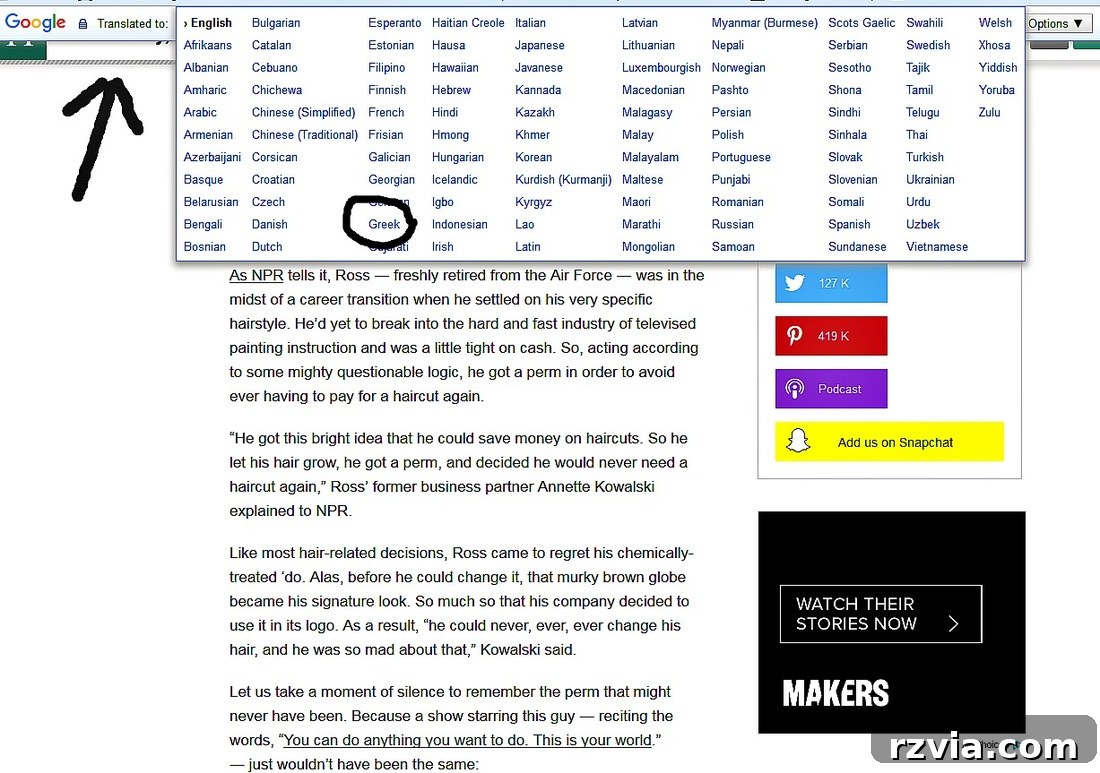
Google Chrome, being one of the most widely used browsers globally, offers a remarkably intuitive and integrated translation feature that simplifies the process of reading foreign-language websites. For most users, this functionality is enabled by default, making it incredibly accessible. When you navigate to a page written in a language different from your browser’s default setting, Chrome typically detects this automatically and presents a translation prompt.
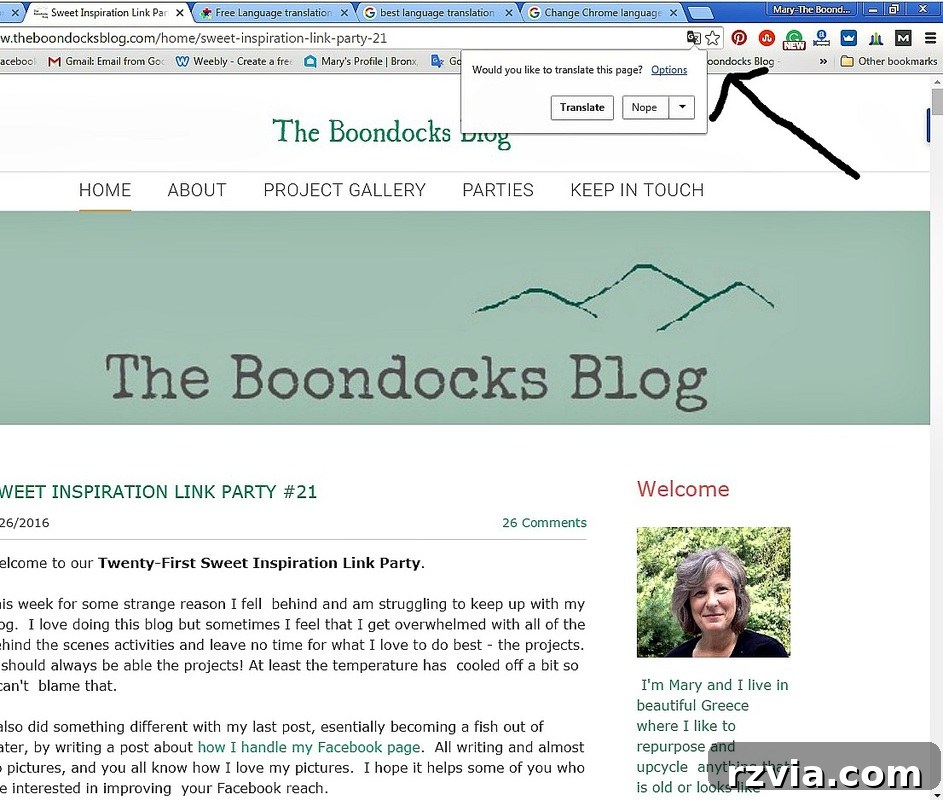
As illustrated in the image above, a small pop-up bar will typically appear at the top of your browser window. This bar usually shows the detected language of the page (e.g., “English”) and offers to translate it into your preferred language (e.g., “Greek”). To initiate the translation:
- Click on the language you wish to translate to (in this case, “Greek”).
- For a more streamlined experience in the future, you might also see an option or checkbox that says “Always translate [original language] to [your preferred language].” Selecting this option will automatically translate all subsequent pages from that original language without needing to click the prompt each time. This is particularly useful if you frequently visit sites in the same foreign language.
- Finally, click the “Translate” button to instantly convert the entire page content into Greek.
This process is designed for maximum user convenience, ensuring that language barriers don’t hinder your access to information or entertainment online.

And just like that, with a simple click, you’ll have the entire webpage translated into Greek. While no automated translation is ever absolutely perfect, particularly with nuanced language or specific idioms, these browser tools have advanced significantly. The translations they provide are remarkably accurate and comprehensive, certainly no worse, and often far superior, to the informal, “broken Greek” translations I’ve been attempting to provide. You’ll find that the core message and instructions of each post are clearly conveyed, allowing you to fully engage with the content without a language barrier.
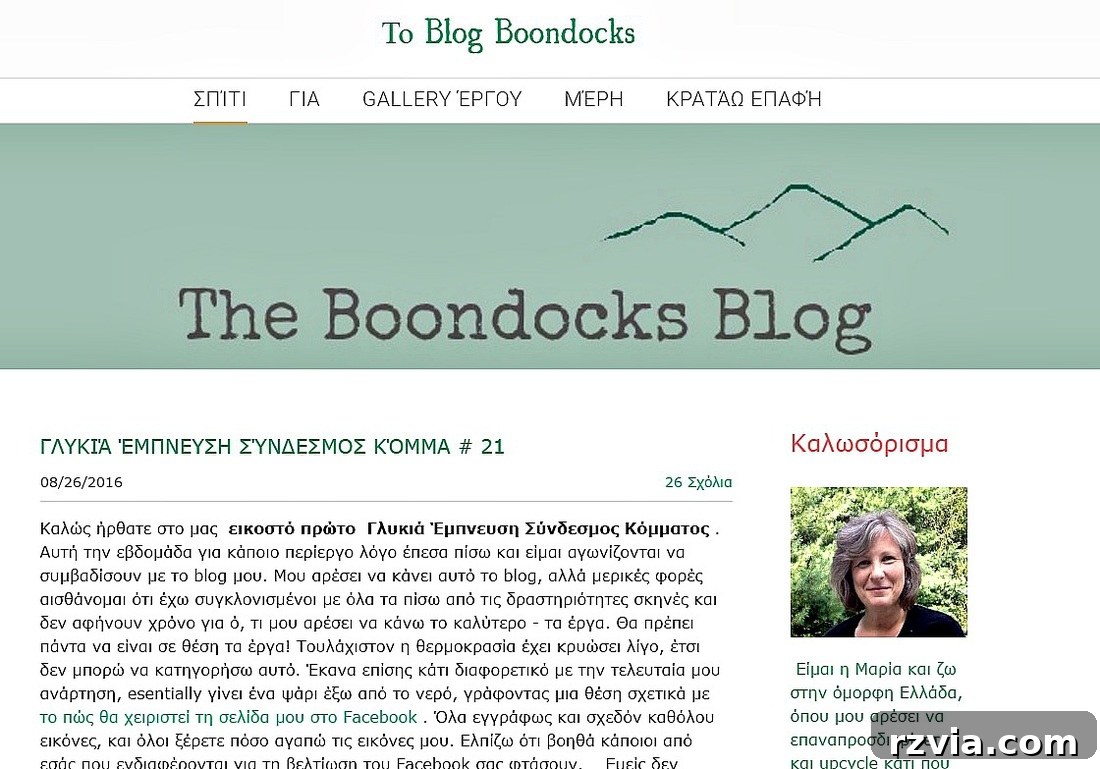
Translating with Safari Browser: Extensions for Mac Users
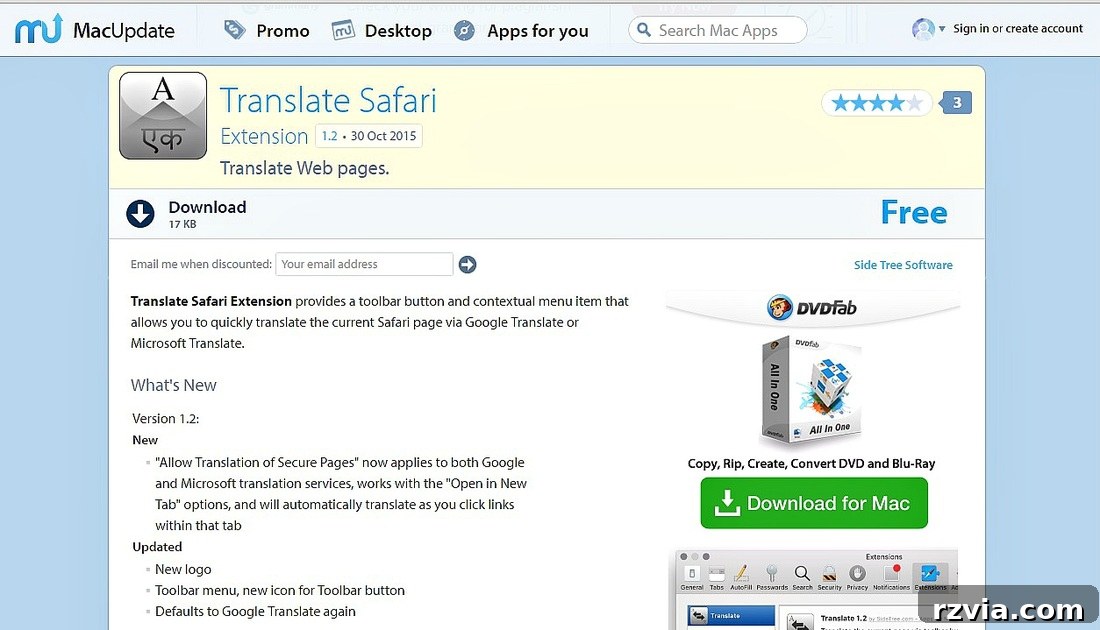
For those of you who primarily use Apple devices and browse with Safari, the translation process might involve a slightly different approach, as Safari does not always have the same prominent built-in translation bar as Chrome. My personal experience with Safari is limited, as I do not use it as my primary browser, but I’ve researched the most popular and reliable solutions for you. Safari users often leverage browser extensions to enhance functionality, and translation is no exception.
A highly recommended and widely used translation extension for Safari can be found on platforms like MacUpdate. I located a popular option here. Extensions are small software programs that customize your browsing experience. Once installed, they typically integrate seamlessly into your browser’s toolbar or context menu, allowing for quick access to their features.
To use an extension for translation in Safari:
- Visit the link provided or search for a reliable “Translate Safari Extension” in the Mac App Store or other reputable extension marketplaces.
- Follow the installation instructions, which usually involve downloading the extension and then enabling it within Safari’s preferences (Safari > Preferences > Extensions).
- Once installed and enabled, you’ll typically find an icon for the translation tool in your Safari toolbar. When on a page you wish to translate, click this icon.
- The extension will then provide options to translate the page, often allowing you to select your target language, such as Greek.
This method ensures that even without a native, omnipresent translation bar, Safari users can enjoy the same level of multilingual content access as users of other browsers, maintaining a smooth and efficient reading experience on their Apple devices.
Effortless Translation with Mozilla Firefox
Mozilla Firefox, known for its strong privacy features and customization options, also provides excellent solutions for translating web content. While it might not have an in-built, always-on translation bar like Chrome, its robust add-on ecosystem allows for powerful translation capabilities through third-party extensions. These add-ons seamlessly integrate into the browser, offering a user-friendly way to overcome language barriers.
One of the most popular and highly-rated translation add-ons for Firefox is S3.Google Translator. This add-on leverages Google’s powerful translation engine to provide quick and accurate translations directly within your browser. You can easily find and install this add-on (or a similar reputable one) by visiting the official Mozilla Firefox Add-ons store. I have located the S3.Google Translator add-on here.
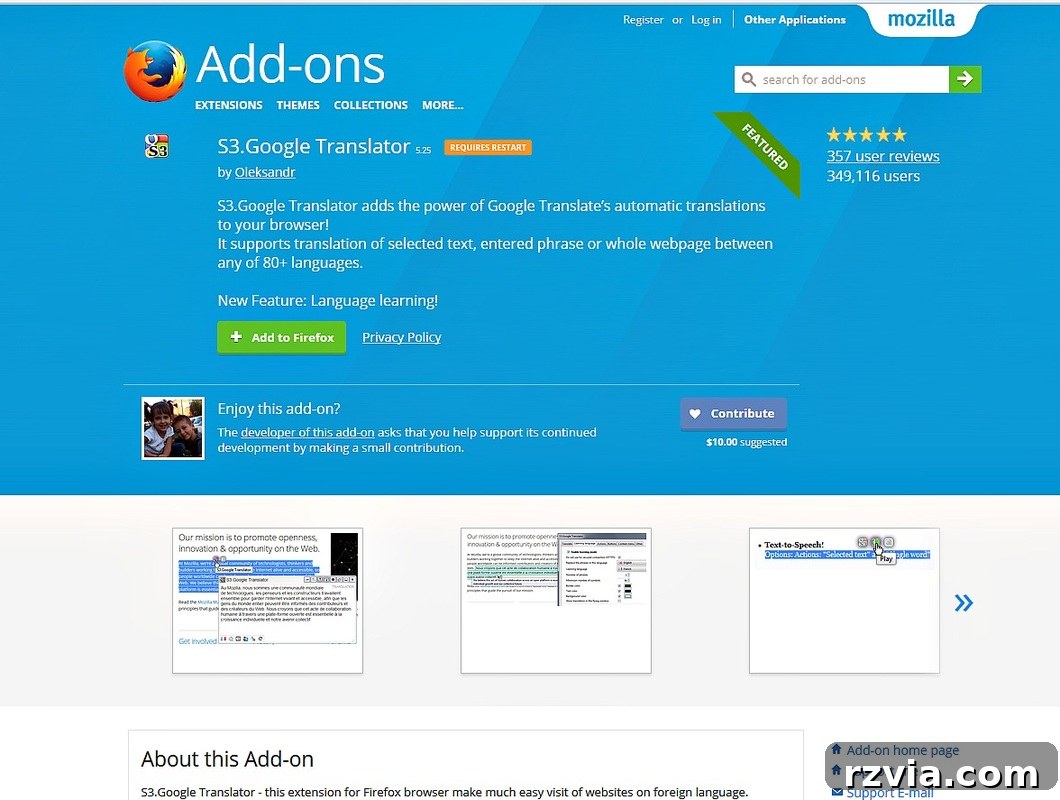
Once you’ve installed the S3.Google Translator add-on:
- After installation, you may need to restart Firefox or simply refresh the page you wish to translate.
- A new icon for the translator add-on will typically appear in your Firefox toolbar. This icon is your quick access point for translation features.
- When you are on a webpage that you want to read in Greek, simply click this toolbar icon.
- The add-on will present you with various translation options. You can usually choose to translate the entire page, selected text, or even specific frames. Crucially, you will be able to select “Greek” as your target language from a dropdown menu or similar interface.
This method provides a flexible and efficient way to translate content, giving you control over what and how much is translated. Firefox users can thus enjoy all the blog’s content seamlessly, enhancing their reading experience without a hitch.
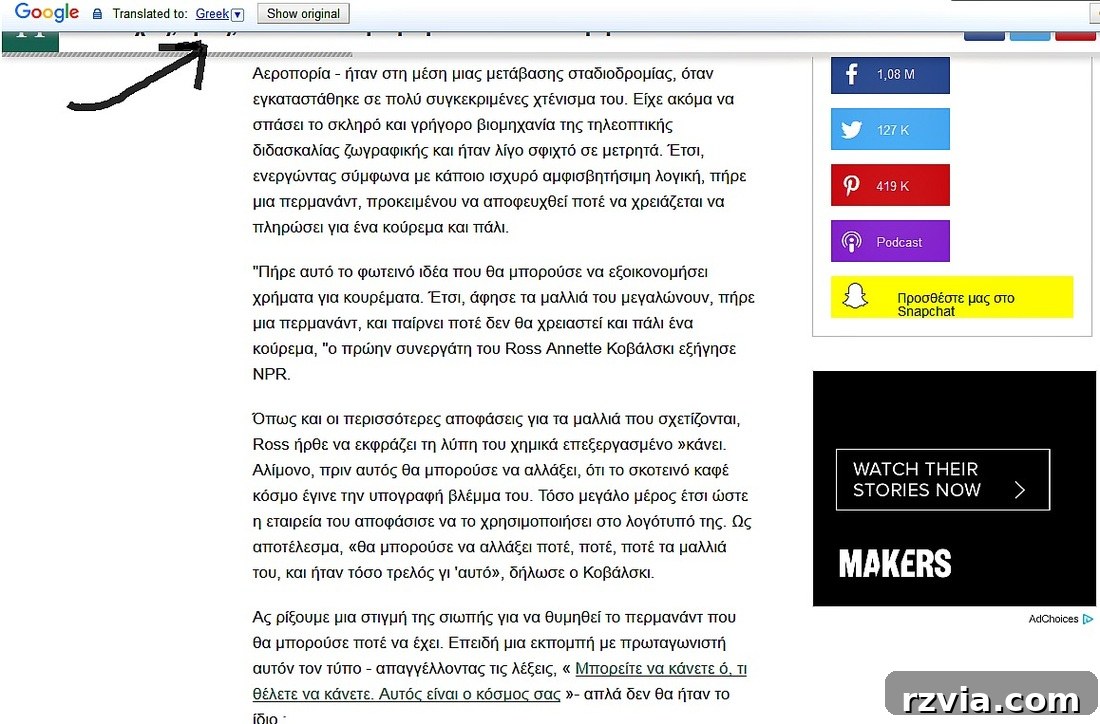
Following these simple steps, you will see the entire webpage transformed, with the text now displayed in Greek. The add-on clearly indicates that the translation has been applied, ensuring you know you’re reading the content in your chosen language. This empowers you to stay connected with all the latest DIY projects, decor inspirations, and personal stories shared on the blog, regardless of the original language. These tools represent a significant advancement in web accessibility, putting the power of translation directly into your hands.
A New Chapter: Focusing on Core Strengths
These three methods offer reliable and efficient ways to translate content across the most popular web browsers. While I genuinely regret that I cannot continue providing my personal, albeit “broken,” Greek translations, I believe this transition ultimately serves your best interests. By relying on advanced, dedicated translation tools, you gain access to a quality and consistency that an individual blogger simply cannot sustain across a growing volume of content.
This shift allows me to re-focus my energy and time where it can yield the greatest benefit for all readers: on creating the highest possible quality content. My commitment is to deliver inspiring projects, insightful guides, and beautiful photography that truly resonates. I believe it’s far more impactful to concentrate on my core strengths—the creativity, meticulous planning, and visual storytelling that underpin every post—and leave the complexities of multi-language translation to the experts in that field.
My hope is that the clarity and detail in my photographs, combined with concise and engaging writing, will be so effective that language becomes a secondary consideration. The visual elements are designed to speak volumes, explaining concepts and steps in a universally understandable way. Thank you once again for your incredible understanding, continuous support, and for being such a vital part of this blogging community. I am truly grateful for your time and dedication, and I eagerly anticipate our continued journey together.
For your convenience, I will be adding a link to this helpful guide in my blog’s sidebar, ensuring easy access whenever you need to translate content.
You may also like:
<< School Bag Makeover IBC Home Facebook Photography for August >>
This blog is for entertainment purposes only; my DIY tutorials are not professional advice. Read my full disclaimer here.
I love hearing from you! Your comments mean the world to me, and I make sure to reply to each and every one. Please help keep the comment section clean and safe by refraining from adding hyperlinks to your comments, otherwise, we cannot publish them. Thank you for your understanding and continued engagement!